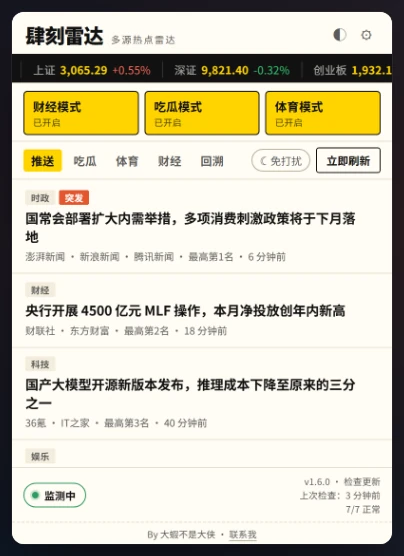
Sixty-nine public sources, folded into the corner of your browser. When several of them push the same story to the top at once, it speaks first — as an in-page card on whatever you are reading.
The store version updates itself. No access to Google? Use the offline package — three steps.
This extension is desktop-only
Mobile browsers cannot install Chrome extensions. Copy this link to a computer and follow the steps there.
69built-in sources
3finance · buzz · sports
0developer servers
123 KBpackage size
Three sentences, that is all it does
Cross-source resonance
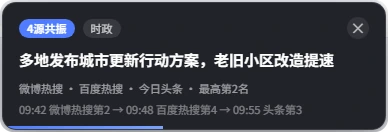
One outlet shouting is not news. When several independent sources push the same story to the top together, it gets priority and a tag.
Routed by context
Reading a page: a card appears top-right. Browser in the background: a system notification. Browser closed: silence.
Three modes
Finance, Buzz and Sports. Tabs appear and disappear with the mode, so nothing unused takes up room.
01Alerts
The alert lands on the page you are already reading
Not another site you have to remember to open. When something new surfaces, a card appears in the top-right corner of the current page. Multiple alerts queue up one by one instead of covering the screen.
Foreground: in-page card, dismisses itself
Background: system notification, opens the source
Browser closed: nothing fires
news.ruanspace.com
02Sources
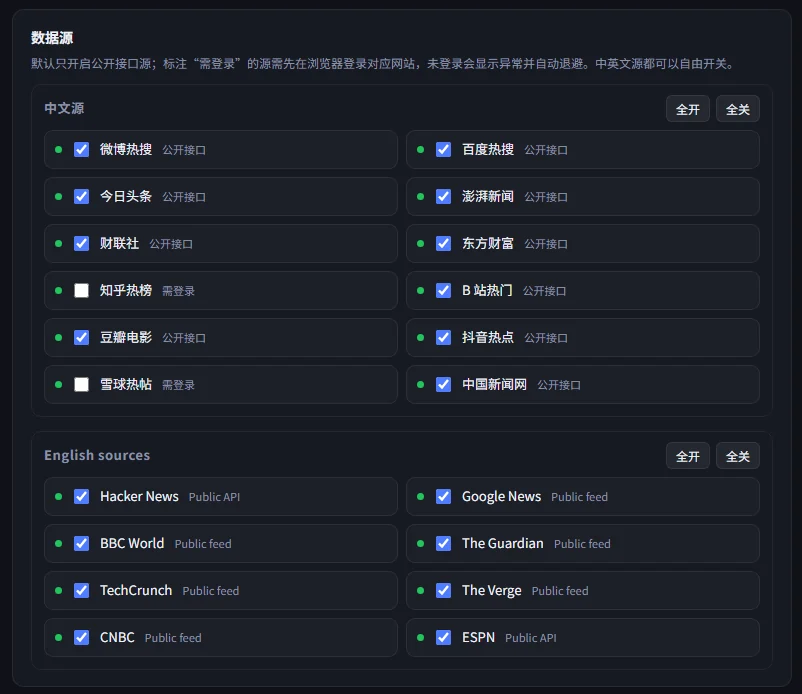
Sixty-nine sources — switch off all but the ones you care about
Chinese social lists, finance, tech, world news and sports, managed in separate columns. Every source toggles on its own. Sources marked "login required" are off by default, and only titles and links are read.
69 built-in public sources, Chinese and English
Custom sources: RSS / Atom, JSON APIs, web pages
Titles and links only — no article text, no images
03Ticker
And it carries fuel and gold prices in the top bar
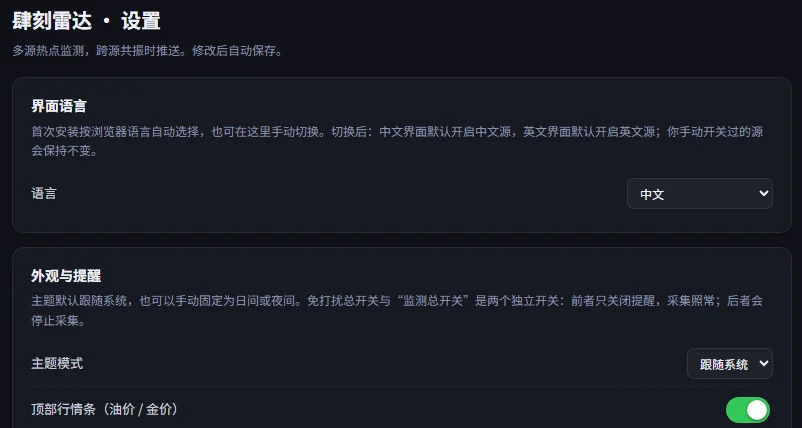
Local fuel and gold prices by city, with optional A-share and HK/US indices, FX rates, Bitcoin and social trending lists appended to the ticker. Refresh every 5, 10, 30 or 60 minutes.
City detected automatically, or set by hand
Up to 20 watchlist stocks, 30-second refresh during trading
Do Not Disturb mutes alerts only — collection keeps running
Install
Two routes, pick one. No account, no browser settings changed.
Behind the firewall? Use the offline package on the right.
BOffline packageWorks behind the firewall
Unzip it and you have a folder. That is the whole download.
Download and unzip. Check that manifest.json sits directly inside the folder — if your unzip tool nested it one level deeper, pick the inner folder during install.
Paste chrome://extensions into the address bar. On Edge it is edge://extensions.
Turn on "Developer mode" (top right), click "Load unpacked", and select the folder. A 「肆」 icon appears next to the address bar — it may be tucked into the puzzle menu, pin it to keep it visible.
For extensions loaded in developer mode, Chrome shows "Disable developer mode extensions" each time it starts. Click the × — it is not an error and blocks nothing.
It will not update itself.
Side-loaded extensions are not part of store updates. When a new version lands, download it, unzip over the same folder, then hit reload on the extensions page. Your settings and history stay.
Why is there no one-click install?
Since Chrome 33, Windows and macOS builds refuse to install .crx files from outside the Web Store — a downloaded file is blocked outright. That is a browser-level restriction and no web page can work around it. So the offline route is always: unzip, enable developer mode, load unpacked. One click plus automatic updates only exists on the store.
Want to be sure the file is the same one? Check it yourself:d5ab57db7950160053a8df1ba80ba491d800498d92cc39cbb9dab48b7b7414b1
Questions
Will it slow my browser down?
No. Fetching runs on a background timer with backoff on failure, so nothing hammers an endpoint. Each source returns titles and links only — tens of kilobytes per request.
Is any of my data uploaded?
No. Settings, snapshots, history and the watchlist live in local browser storage. There is no developer server, no analytics SDK and no ad SDK. Details in the privacy policy.
Does it work on a phone?
No. Extensions run only in desktop Chrome, Edge, 360 or QQ browsers. On a phone, use the website — same lists, same sources.
How do I uninstall it?
Click "Remove" on the extensions page. Local data is deleted with it, nothing left behind.
How does it relate to the website?
The site is "open it and read". The extension is "it tells you without opening anything". Same person maintains both, same sources.
Any ads?
None. There is no ad slot and no promotional link inside the extension.
Release notes
v1.6.0 · first public release
Update check added: version and check-for-updates in the popup footer and settings
"Check now" renamed to "Refresh" — it fetches headlines only, never checks for updates